Showing posts with label tag cloud. Show all posts

Thursday, September 17, 2009

Tag Cloud now on CodePlex

After a suggestion by Tim Heuer I've put the code for the Visual Tag Cloud on CodePlex.


Hopefully this will allow people to contribute and enhance it!

Sunday, July 12, 2009

Silverlight Coding Competition

I've entered my tag cloud into this competition on the of chance that I might win ;-)

http://www.componentart.com/community/competition2009/details.aspx?id=1016

so give us a vote please! (note the tags for this post)

Thursday, June 25, 2009

How the silverlight tag cloud works, including source code

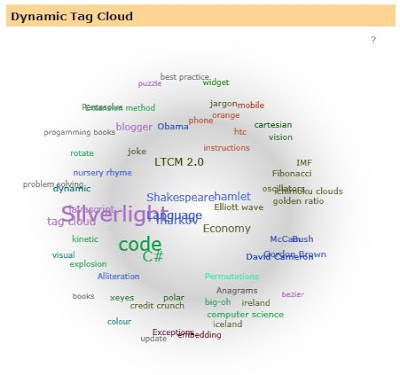
The TagCloud Silverlight application allows a user to see a visual representation of an RSS feed. It shows a visualization of the labels used within a feed, using size to indicate frequency and closeness to other tags showing frequency of co-occurrence.
This means that tags that occur often together (for example “Silverlight” and “Xaml”) will tend to appear next to each other, whilst tags that don’t occur together in the feed (for example “Silverlight” and “Credit Crunch”) will tend to be far apart.
Colour is also used to group the tag cloud, with the most frequently occurring tags taking a colour, and co-occurring tags inheriting that colour. This visually groups the cloud by colour as well.
Mouse-Over a tag shows lines to all other tags that it has occurred with, and clicking presents a popup menu of posts that mention that tag. Clicking on an item in the menu navigates to that post.
You can also click and drag a tag for fun, and watch all the other tags chase it..
Model
  • Cloud: the model of a RSS feed, separating the model from the UI. Processes an RSS feed and create subordinate Post and Tag with relationships. The cloud class is more of a management class that delegates most of the work to the Tag class.
  • Post: very simple class that represents a post/entry in an RSS feed. Used to allow navigation back to a particular post.
  • Tag: represents a tag (label/syndicationItem) in an RSS feed. Holds frequency count of how many times it has co-occurred with other tags. Has a SeekHarmony function that does the majority of the application “ah!” factor.
Approach
The application builds an internal model of the RSS feeds, critically in terms of tags and their co-occurrences. It then follows a simulation approach, where it tries to position each tag such that it is near tags it has co-occurred with, and far from tags it has not.
The algorithm for doing this does not pay attention to the overall cloud shape, but acts as an emergent system – the application of the simple harmony seeking behaviour between tags creating a global balance (generally a circle)
Code structure
Four parts
  • JavaScript library to make embedding the application less error prone
  • A server based proxy for getting RSS feeds to avoid cross domain issues
  • A silverlight library for math functions (mostly polar calculations and some extension methiods)
  • TagCloud silverlight application, with App and Page classes and three supporting classes (Cloud, Post and Tag)
Lifecycle
The silverlight application is embedded in a HTML page which passes a number of parameters via JavaScript to the Silverlight object creation code. The Silverlight application reads these settings and downloads the RSS feed via a server side proxy (to avoid cross-domain issues). The code then build an internal model of the RSS feed, with co-occurrence information about tags. On a timer basis the code then moves each tag such that it is nearer tags it co-occurred with, and further from ones it has not occurred with. Over time an order emerges which shows how the tags relate – tags that are nearer co-occur more.
Embedding the control in the page
For my blog I use JavaScript to embed the silverlight control
<div id='feCloud' style='text-align: center;'/>  
 <script src='http://www.figmentengine.com/tagCloud/feCloudv1.2.js' type='text/javascript'/>  
 <script type='text/javascript'>  
  var feCloudElementId = 'feCloud';  
  var feCloudFeedAddress = 'http://feedproxy.google.com/FigmentEngine';  
  var feCloudNavigateFormat = 'http://blog.figmentengine.com/search/label/{0}';  
  var feCloudSize = 400;  
  feTagCloudLoad(feCloudElementId, feCloudFeedAddress, feCloudNavigateFormat, feCloudSize, feCloudSize);  
 </script> 
 
The function in the feCloudv1.2.js is a wrapper for the Silverlight.js createObject call:
function feTagCloudLoad(elementId, feed, navigateFormat, width, height)
{
  var params = "";

  if (feed != null)
    params += "feedAddress=" + feed + ", ";
  if (navigateFormat != null)
    params += "navigateFormat=" + navigateFormat + ", ";

  var slWidth = 350;
  if (width)
   slWidth = width;
  params += "width=" + slWidth + ", "; 

  var slHeight = 350;
  if (height)
   slHeight = height;

  var container = document.getElementById(elementId);
  var cloudControl = document.createElement('object');
  
  cloudControl.setAttribute('data', 'data:application/x-silverlight-2,');
  cloudControl.setAttribute('type', 'application/x-silverlight-2');
  cloudControl.setAttribute('id', 'feCloudControl');
  container.appendChild(cloudControl);

  var host = "http://www.figmentengine.com/";
  var source = host + "tagCloud/TagCloudV1.2.xap";
  var parentElement = container;
  var callbackId = "feCloud";
  var properties = { width: slWidth, height: slHeight, version: "2.0.31005.0", enableHtmlAccess: "true" };
  var events = { };
  var initParams = params;
  Silverlight.createObject(source, parentElement,
   callbackId, properties, events, initParams);
}
I’ve put in bold the section that deals with passing the feed information via initParams. I also set enabledHtmlAccess to allow the Silverlight code to navigate the browser using HtmlPage.Window.Navigate.
Application startup
Reads the settings specified in the embedding JavaScript, most importantly the address of the RSS feed and how to navigate to page. It creates an instance of the Page and asks it to populate the TagCloud based on the feed address information.
Populating the cloud
Obtain the RSS feed: Due to issues in making requests to websites that the silverlight does not originate from I use the technique outlined at Franksworld (when your silverlight app needs to get data from another server that does not contain a crossdomain.xml then it proxies the call via the server)
protected void Page_Load(object sender, EventArgs e)
    {
        // Load the URI from the Query String
        string sourceUriString = Request.QueryString["Uri"];

        try
        {
            // Clear the output buffer
            Response.Clear();

            // Make new WebClient 
            WebClient webClientRequest = new WebClient();

            // Download data from URI
            byte[] requestByteArray = webClientRequest.DownloadData(sourceUriString);

            // Match the Mime Types
            string contentType = webClientRequest.ResponseHeaders["Content-type"].ToString();
            Response.ContentType = contentType;

            // Copy the Streams
            int requestByteArrayLength = requestByteArray.GetLength(0);
            Response.OutputStream.Write(requestByteArray, 0, requestByteArrayLength);
            Response.OutputStream.Close();

            // Exit the Page
            // see http://support.microsoft.com/kb/312629
            //Response.End();
            HttpContext.Current.ApplicationInstance.CompleteRequest();

        }
        catch(Exception ex)
        {
            // 5xx errors mean server error
            Response.StatusCode = 501;
            Response.StatusDescription = "Error encountered. Details: " + ex.Message;
        }
    }
Conversion of the RSS into the internal object model ignores most of the information in the feed, concentrating on posts, tags and co-occurrence.
Initializing the UI
At start-up the code creates a pool of connecter lines (to reduce the need to create them dynamically). It also create TextBlocks to represent each tag. It then start the timer to repeatedly move the tags around (seeking harmony)
Seeking Harmony
The code only works at a tag level, relying on emergent behaviour to get the UI effect. For each tag we do the following:
  • Each tag calculates how near it should be to all the other tags based on frequency of co-occurrence.
  • It then uses a polar conversion to work out the vector it would need to move in to get to this position.
  • We add up all these vectors for the tag, which gives us a vector that if it applied would be the ideal location for it.
  • We then down-scale the vector:
  1. So tags don’t jump massive distances
  2. Tags can react to where all the other tags have moved to on the next cycle 
Source code
Source code available as a zip

Tag cloud seeking harmony

I'm about to release the code for the tag cloud - here's a teaser of the code that each tag runs to seek harmony:

  internal void SeekHarmony(IEnumerable<Tag> valueCollection, double SIZE)
  {
   double maxOccurance = OccuredCount + 0.1d;

   // how we scale the whole cloud, 4 would be exactly the size of the area
   // 3 would be slightlight larger and 5 would be smaller
   const double ATTRACTION_SCALE = Math.PI;
   // how much tags that have not cooccurred repel each other
   // ϕ (golden ratio) gives us a nice aesthic
   const double REPEL_RATIO = 1.618d;
   // how much tags that cooccurred attract each other
   // it must be greater than the repel rate or everything
   // will fly away from each other
   const double ATTRACT_RATIO = Math.E;

   // assume we don't need to be moved
   Point offset = new Point(0, 0);

   // work out where the best place in 2d space to be
   // would be given where all the other tags are
   foreach (Tag otherTag in valueCollection)
   {
    // ignore ourself
    if (otherTag == this)
     continue;

    // work out vector bewteen us and the other tag
    Polar vector = Trigonometry.CartesianToPolar(this.Point, otherTag.Point);

    // how far apart?
    double distance = vector.Magnitude;

    // how much they repel by default
    double desiredDistance = maxOccurance * REPEL_RATIO;
    // did we co-occur with the other tag?
    int cooccurred = this[otherTag];
    if (cooccurred != 0)
     // we want to closer to the other tag based on frequency
     desiredDistance /= (cooccurred * (ATTRACTION_SCALE / ATTRACT_RATIO));

    // scale the distance based on the play area and how important
    // the other tag is compared to all the tags we co-occurred with
    distance = SIZE * (desiredDistance / (ATTRACTION_SCALE * maxOccurance));
    distance = (vector.Magnitude - distance); // towards not away

    // work out what vector needs to be applied to our
    // current position to move us closer
    Polar desiredVector = new Polar(vector.Direction, distance);
    Point offsetPoint = Trigonometry.PolarToCartesian(desiredVector);

    // accumlate all the proposed changes
    offset.X += offsetPoint.X;
    offset.Y -= offsetPoint.Y;
   }

   // update our new position, (scaled to fit within play area)
   // and also scaled to allow gradual movement
   double rateOfChange = SIZE / ATTRACTION_SCALE;
   point.X += offset.X / rateOfChange;
   point.Y += offset.Y / rateOfChange;
  }
hopefully I will post all the code and zip file tomorrow..

Friday, January 16, 2009

Silverlight tag cloud v1.4

A bug fix to the Silverlight code, in rare cases it colours very frequently co-occurring tags so they are hard to see.

I've updated the Silverlight XAP file and pointed the javascript to use this version - so anyone using 1.3 will not have to do anything to get this fix.


I've also created a super-sized version as a holding page for my www site, it's interesting to see how it performs given more space.

Monday, January 5, 2009

Silverlight tag cloud v1.3

I've updated the Silverlight Tag Cloud to version 1.3, this was mainly due to my tidying up of the code prior to publication. I've also improved the use of colour to show groupings better.


more soon..

Monday, November 10, 2008

Dynamic tag cloud v1.2

A small update to the tag cloud to fix an issue with cross domain requests. The issue is caused by some RSS servers not having a crossdomain.xml file which is used by Flash and Silverlight to check if cross domain requests are allowed.

As a short term fix this version now proxies the request via figmentengine.com - in a later version we may need to be able to disable this (in the case where you want to host the silverlight app on your server)

So this now allows me to create tag cloud from other sites, such as the Guardian's Comment is free:


To insert into your blog use (under dashboard, layout, edit html, ensure that expand widget templates is checked).

Find the following:

<div id='sidebar-wrapper'>
<b:section class='sidebar' id='sidebar' preferred='yes'>

insert widget here


<b:widget id='Label2' locked='false' title='Dynamic Tag Cloud' type='Label'>
<b:includable id='main'>
<b:if cond='data:title'>
<h2><data:title/></h2>
</b:if>
<div class='widget-content' id='feCloud' style='text-align: center;'/>
<script src='http://www.figmentengine.com/tagCloud/feCloudv1.2.js' type='text/javascript'/>
<script type='text/javascript'>
var feCloudElementId = 'feCloud';
var feCloudFeedAddress = 'http://feedproxy.google.com/FigmentEngine';
var feCloudNavigateFormat = 'http://blog.figmentengine.com/search/label/{0}';
var feCloudSize = 400;
feTagCloudLoad(feCloudElementId, feCloudFeedAddress, feCloudNavigateFormat, feCloudSize, feCloudSize);
</script>
</b:includable>
</b:widget>

In order to start using this version, you need to change your javascript to reference v1.2 of the js file

Friday, November 7, 2008

Silverlight tag cloud

Updated to version 1.1

Animated Tag Cloud

changes are:

  • have made the id of the element that the cloud is created parameter driven (see feCloudElementId) below in Javascript

  • click on a label now shows a simple pop-up selections of posts, clicking on the first item will show all posts with that label, other entries take you direct to the post

  • Changed the background sphere to be silver rather than yellow - big change ;-)

  • mousing over a label now shows its co-occurances visually with lines


To insert into your blog use (under dashboard, layout, edit html, ensure that expand widget templates is checked).

Find the following:

<div id='sidebar-wrapper'>
<b:section class='sidebar' id='sidebar' preferred='yes'>

insert widget here


<b:widget id='Label2' locked='false' title='Dynamic Tag Cloud' type='Label'>
<b:includable id='main'>
<b:if cond='data:title'>
<h2><data:title/></h2>
</b:if>
<div class='widget-content' id='feCloud' style='text-align: center;'/>
<script src='http://www.figmentengine.com/tagCloud/feCloudv1.1.js' type='text/javascript'/>
<script type='text/javascript'>
var feCloudElementId = 'feCloud';
var feCloudFeedAddress = 'http://feedproxy.google.com/FigmentEngine';
var feCloudNavigateFormat = 'http://blog.figmentengine.com/search/label/{0}';
var feCloudSize = 400;
feTagCloudLoad(feCloudElementId, feCloudFeedAddress, feCloudNavigateFormat, feCloudSize, feCloudSize);
</script>
</b:includable>
</b:widget>


In order to start using this version, you need to change your javascript to reference v1.1 of the js file, and add an additional parameter of the id of cloud element. This should allow you to host multiple clouds on the same page, or at least give more flexibility about the cloud id.

Thursday, November 6, 2008

Silverlight tag cloud for blogger

So finished the first workable version of the widget.

To insert into your blog use (under dashboard, layout, edit html, ensure that expand widget templates is checked).

Find the following:

<div id='sidebar-wrapper'>
<b:section class='sidebar' id='sidebar' preferred='yes'>

insert widget here


<b:widget id='Label2' locked='false' title='Dynamic Tag Cloud' type='Label'>
<b:includable id='main'>
<b:if cond='data:title'>
<h2><data:title/></h2>
</b:if>
<div class='widget-content' id='feCloud' style='text-align: center;'/>
<script src='http://www.figmentengine.com/tagCloud/feCloudv1.js' type='text/javascript'/>
<script type='text/javascript'>
var feCloudFeedAddress = 'http://feedproxy.google.com/FigmentEngine';
var feCloudNavigateFormat = 'http://blog.figmentengine.com/search/label/{0}';
var feCloudSize = 400;
feTagCloudLoad(feCloudFeedAddress, feCloudNavigateFormat, feCloudSize, feCloudSize);
</script>
</b:includable>
</b:widget>


changing
var feCloudFeedAddress = 'http://feedproxy.google.com/FigmentEngine';
to your feed address, note that I am using feedburner so I need to put my feedburner address here
and change
var feCloudNavigateFormat = 'http://blog.figmentengine.com/search/label/{0}';
to the url that pulls up all items that have a particular label, the widget will replace the "{0}" with the label name dynamically.
the size of the widget is controlled by:
var feCloudSize = 400;
which is the size in pixels.

common problems:

  • no labels appear - do your feed entries have labels - check the address of the feed and see what you get when you open it in your browser. Also check ensure you give the syndicated address, so if you are using feedburner etc then you need to give that address, not always the address you get from feed button on the browser.

  • all labels link to the same place - ensure you have put the "{0}" in the format string in the correct place.


I will update the control to allow individuals posts to be selected (by expanding the label on click)

In terms of security, you can copy the javascript files onto your server. The silverlight widget runs in a sandbox, so you can run it from my server, or hsot it on your own.

Note you should be able to use this on other blogging sites apart from blogger - the code between (and including) the DIV tag is all you need.

any problems drop a comment below!

Wednesday, November 5, 2008

Silverlight tag/label cloud for blogger

I've started trying to convert my silverlight tag cloud into a widget for blogger.

not fun :-( Blogger documentation is minimal, and I wasted too much time try to get blogger to tell me the feed address.

Have stopped at the hard-coded version for now - will move it forward later.

This latest version allows you to click on labels and see visually what the co-occurred with. Next steps will be to be able to see the list of posts for a label and to be able to open that post...

This representation does more that just look at how many times a label has been used (as per the blogger widget) - it looks at when the labels where used with other labels - which hopefully give a better "view" of what you are bloggin about.

more later, however the intention is to wrap this up into a widget that anyone can use on their blogger blog..

Saturday, November 1, 2008

Dynamic tag cloud in silverlight with colour

The first version started to show the relationships, adding some simple colour coding makes the co-occurance more obvious and starts to show the themes of a blog:


I've added the ability to use other RSS feeds, however there are some security issues that mean for lots of feeds this code will just fall over..

Two feeds that work apart from mine are:
http://feeds.feedburner.com/PolymathProgrammer?format=xml
http://feeds.feedburner.com/programmableweb
see if you can work out their topics by the tag cloud!

Friday, October 31, 2008

Dynamic tag cloud in silverlight

Trying to build a tag cloud in Silverlight that represents co-occurance as well, heres my first cut:


The code reads my RSS feed and looks at the labels - this should work for any blog..
trying dragging for fun! I'll post the code once I've mad a few more enhancements (and checked my math!)