Showing posts with label Silverlight. Show all posts

Thursday, June 25, 2009

How the silverlight tag cloud works, including source code

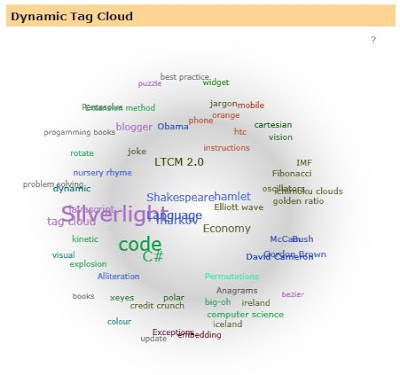
The TagCloud Silverlight application allows a user to see a visual representation of an RSS feed. It shows a visualization of the labels used within a feed, using size to indicate frequency and closeness to other tags showing frequency of co-occurrence.
This means that tags that occur often together (for example “Silverlight” and “Xaml”) will tend to appear next to each other, whilst tags that don’t occur together in the feed (for example “Silverlight” and “Credit Crunch”) will tend to be far apart.
Colour is also used to group the tag cloud, with the most frequently occurring tags taking a colour, and co-occurring tags inheriting that colour. This visually groups the cloud by colour as well.
Mouse-Over a tag shows lines to all other tags that it has occurred with, and clicking presents a popup menu of posts that mention that tag. Clicking on an item in the menu navigates to that post.
You can also click and drag a tag for fun, and watch all the other tags chase it..
Model
  • Cloud: the model of a RSS feed, separating the model from the UI. Processes an RSS feed and create subordinate Post and Tag with relationships. The cloud class is more of a management class that delegates most of the work to the Tag class.
  • Post: very simple class that represents a post/entry in an RSS feed. Used to allow navigation back to a particular post.
  • Tag: represents a tag (label/syndicationItem) in an RSS feed. Holds frequency count of how many times it has co-occurred with other tags. Has a SeekHarmony function that does the majority of the application “ah!” factor.
Approach
The application builds an internal model of the RSS feeds, critically in terms of tags and their co-occurrences. It then follows a simulation approach, where it tries to position each tag such that it is near tags it has co-occurred with, and far from tags it has not.
The algorithm for doing this does not pay attention to the overall cloud shape, but acts as an emergent system – the application of the simple harmony seeking behaviour between tags creating a global balance (generally a circle)
Code structure
Four parts
  • JavaScript library to make embedding the application less error prone
  • A server based proxy for getting RSS feeds to avoid cross domain issues
  • A silverlight library for math functions (mostly polar calculations and some extension methiods)
  • TagCloud silverlight application, with App and Page classes and three supporting classes (Cloud, Post and Tag)
Lifecycle
The silverlight application is embedded in a HTML page which passes a number of parameters via JavaScript to the Silverlight object creation code. The Silverlight application reads these settings and downloads the RSS feed via a server side proxy (to avoid cross-domain issues). The code then build an internal model of the RSS feed, with co-occurrence information about tags. On a timer basis the code then moves each tag such that it is nearer tags it co-occurred with, and further from ones it has not occurred with. Over time an order emerges which shows how the tags relate – tags that are nearer co-occur more.
Embedding the control in the page
For my blog I use JavaScript to embed the silverlight control
<div id='feCloud' style='text-align: center;'/>  
 <script src='http://www.figmentengine.com/tagCloud/feCloudv1.2.js' type='text/javascript'/>  
 <script type='text/javascript'>  
  var feCloudElementId = 'feCloud';  
  var feCloudFeedAddress = 'http://feedproxy.google.com/FigmentEngine';  
  var feCloudNavigateFormat = 'http://blog.figmentengine.com/search/label/{0}';  
  var feCloudSize = 400;  
  feTagCloudLoad(feCloudElementId, feCloudFeedAddress, feCloudNavigateFormat, feCloudSize, feCloudSize);  
 </script> 
 
The function in the feCloudv1.2.js is a wrapper for the Silverlight.js createObject call:
function feTagCloudLoad(elementId, feed, navigateFormat, width, height)
{
  var params = "";

  if (feed != null)
    params += "feedAddress=" + feed + ", ";
  if (navigateFormat != null)
    params += "navigateFormat=" + navigateFormat + ", ";

  var slWidth = 350;
  if (width)
   slWidth = width;
  params += "width=" + slWidth + ", "; 

  var slHeight = 350;
  if (height)
   slHeight = height;

  var container = document.getElementById(elementId);
  var cloudControl = document.createElement('object');
  
  cloudControl.setAttribute('data', 'data:application/x-silverlight-2,');
  cloudControl.setAttribute('type', 'application/x-silverlight-2');
  cloudControl.setAttribute('id', 'feCloudControl');
  container.appendChild(cloudControl);

  var host = "http://www.figmentengine.com/";
  var source = host + "tagCloud/TagCloudV1.2.xap";
  var parentElement = container;
  var callbackId = "feCloud";
  var properties = { width: slWidth, height: slHeight, version: "2.0.31005.0", enableHtmlAccess: "true" };
  var events = { };
  var initParams = params;
  Silverlight.createObject(source, parentElement,
   callbackId, properties, events, initParams);
}
I’ve put in bold the section that deals with passing the feed information via initParams. I also set enabledHtmlAccess to allow the Silverlight code to navigate the browser using HtmlPage.Window.Navigate.
Application startup
Reads the settings specified in the embedding JavaScript, most importantly the address of the RSS feed and how to navigate to page. It creates an instance of the Page and asks it to populate the TagCloud based on the feed address information.
Populating the cloud
Obtain the RSS feed: Due to issues in making requests to websites that the silverlight does not originate from I use the technique outlined at Franksworld (when your silverlight app needs to get data from another server that does not contain a crossdomain.xml then it proxies the call via the server)
protected void Page_Load(object sender, EventArgs e)
    {
        // Load the URI from the Query String
        string sourceUriString = Request.QueryString["Uri"];

        try
        {
            // Clear the output buffer
            Response.Clear();

            // Make new WebClient 
            WebClient webClientRequest = new WebClient();

            // Download data from URI
            byte[] requestByteArray = webClientRequest.DownloadData(sourceUriString);

            // Match the Mime Types
            string contentType = webClientRequest.ResponseHeaders["Content-type"].ToString();
            Response.ContentType = contentType;

            // Copy the Streams
            int requestByteArrayLength = requestByteArray.GetLength(0);
            Response.OutputStream.Write(requestByteArray, 0, requestByteArrayLength);
            Response.OutputStream.Close();

            // Exit the Page
            // see http://support.microsoft.com/kb/312629
            //Response.End();
            HttpContext.Current.ApplicationInstance.CompleteRequest();

        }
        catch(Exception ex)
        {
            // 5xx errors mean server error
            Response.StatusCode = 501;
            Response.StatusDescription = "Error encountered. Details: " + ex.Message;
        }
    }
Conversion of the RSS into the internal object model ignores most of the information in the feed, concentrating on posts, tags and co-occurrence.
Initializing the UI
At start-up the code creates a pool of connecter lines (to reduce the need to create them dynamically). It also create TextBlocks to represent each tag. It then start the timer to repeatedly move the tags around (seeking harmony)
Seeking Harmony
The code only works at a tag level, relying on emergent behaviour to get the UI effect. For each tag we do the following:
  • Each tag calculates how near it should be to all the other tags based on frequency of co-occurrence.
  • It then uses a polar conversion to work out the vector it would need to move in to get to this position.
  • We add up all these vectors for the tag, which gives us a vector that if it applied would be the ideal location for it.
  • We then down-scale the vector:
  1. So tags don’t jump massive distances
  2. Tags can react to where all the other tags have moved to on the next cycle 
Source code
Source code available as a zip

Wednesday, January 28, 2009

Moonlight, Silverlight and OpenStreetMap

One of the nice things about creating the map in Silverlight has been the possibilty of using a Moonlight client to reach even more users..

however I seem to be causing problems in moonlight with my OpenStreetMap in Silverlight..

Bad me! I suspect this is because I am really pushing the Silverlight threading model - the application is very UI intensive, which is something that (ironically) Silverlight has problems with (You can't multi-thread UI calls, so everything bottlenecks waiting for Dispatch).

I will try and see if I can help the Moonlight guys with the fixin'

I've been a bit quite on the map front - mainly due to re-engineering the Quadstore to handle the whole planet - this is still ongoing (I'm trying to keep conversion time from OSM dataset to Quadstore to under an hour, and at the same time not use SQL Server)

I have updated the demo to improve a few things:
  • Points of Interest now supported (though theres not mainly in my test data set, my fault not OSM's - I filtered them out, next data upload will fix this) You can see them as blue/red triangles. Hopefully I should be able to start demonstrating the power of the dynamic approach by allowing users to select what POIs to show on the fly.
  • Where's FE? this is really me just playing - from my post on mobile location finding I've added the capability to the cobalt server to track users. My windows smartphnone mobile phone tells the server where it is and this is shown as a little icon - in the future a user can download this app and put their own details in. They can then show this on their own map, and if the choose allow other (selected users) to see their location. You will also be able to tell the system how accurate you want the position to be (so the icon can be placed anywhere within, 100, 10, 1, exact square meters.
  • Road smoothing - I've improved this algorithm to speed this up, mainly by reducing it from O(n2) to O(n) by using a "smarter" approach.
  • Performance - I did a lot of profiling combined with improving the road smoothing alg, has made the map faster, however I'm still unhappy with the 30sec draw time - faster computer do this in about 12-15 seconds. This is too slow, so performance is still on the agenda. I had some good feedback from emj on OpenStreetMap on this - thanks!
The next release of the map should support the full world and complete pan/zoom control..

Friday, January 16, 2009

Silverlight tag cloud v1.4

A bug fix to the Silverlight code, in rare cases it colours very frequently co-occurring tags so they are hard to see.

I've updated the Silverlight XAP file and pointed the javascript to use this version - so anyone using 1.3 will not have to do anything to get this fix.


I've also created a super-sized version as a holding page for my www site, it's interesting to see how it performs given more space.

Thursday, January 8, 2009

Unit testing and Silverlight

Interesting post on NUnit & the Silverlight unit test framework

Though I'm not sure what the utility of running the test within Silverlight is (they are dev tests after all), maybe useful for running scripted user tests?


more on testing in Silverlight...

Monday, January 5, 2009

Silverlight tag cloud v1.3

I've updated the Silverlight Tag Cloud to version 1.3, this was mainly due to my tidying up of the code prior to publication. I've also improved the use of colour to show groupings better.


more soon..

Wednesday, December 31, 2008

2008: a long year

It's that time of year again, where we celebrate the significance of digit roll-over on a completely artificial counter for time - the New Year.

This year has (will) be a long one (BBC: New Year to arrive a tick later), and as is the custom I thought I betters have at least one resolution for the New Year:

  • Start doing more AI - this blog was meant to have more of this, but I seem to have spent most of the year learning technologies (Silverlight and OpenStreetMap - both fun of course!).
So next year I will have to dig out a good book on the subject (Artificial Intelligence in Geography)


And try and combine all three!

Wednesday, December 10, 2008

OpenStreetMap rendering in Silverlight part VIII

One of the issues that my current renderer has is that it's not as smooth as the raster versions used in the slippy map. One of the worst offenders was road junctions, where two roads meet. They looked something like this:


In the image you can see where the two roads meet there is a gap. This is due to my code drawing the two roads as separate polylines. I create a test renderer to see if this could be improved:


This version has joined the two roads together, drawing only one polyline for both of them. This results in a smooth join, and also a reduction in the number of objects. For example joining roads where they share a start and end point reduces the number of objects for south-west London from ~40k to ~30k. So not only does it create nicer looking maps, it makes them less memory intensive.

It occurs to me that this technique could be used for any Xaml consisting of multiple lines, as my findings suggest that Silverlight performs faster (one poly line with a 1,000 segments is faster than 1,000 single line segments)

My join algorithm is brute forced within a tile (creating an O(n2) complexity) which won't do for release code. So I will write a smarter version - hopefully of the order of O(3n).

I also spotted that a lot of ways within OSM are artificially split (the river Thames for example) I don't know if this is a feature of data collection or policy. My QuadStore design can cope with large entities like the river Thames quite easily - so applying this same technique at a higher level may generate smooth maps overall.

Thursday, December 4, 2008

OpenStreetMap rendering in Silverlight part VI

I've spent some time looking at performance, using some of the tricks from Seema's blog - she also very helpfully sent me some helpful tips when trying to build applications with many complex shapes.

Changes to the version now include:
  • Speed/Memory improvement using feature clipping.
  • Tooltips tags for features, (mouse over a line or area to see)


The neeed for speed: performance investigation
This is where the ability to swap drawers has been helpful, I was able to create try out new ideas without having to worry about breaking the existing drawing system. One of the technique's I investigated was drawing using Silverlight's mini-language, this allows you to draw complex shapes using a LOGO like definition:

<Canvas>
<Path Stroke="Black" Fill="Gray"Data="M 10,100 C 10,300 300,-200 300,100" />
</Canvas>

Since I need to draw this dynamically I need to load the Path.Data from a string:

StringBuilder sb = new StringBuilder();
sb.Append("<Path xmlns=\"http://schemas.microsoft.com/winfx/2006/xaml/presentation\"");
sb.Append(" xmlns:x=\"http://schemas.microsoft.com/winfx/2006/xaml\"");
sb.Append(" Data=\"");
sb.Append("");

ShowWay(sb, tileBorder);
foreach (var gpp in quadrant.GeoPolyPoints)
DrawFeature(sb, gpp);

sb.Append("\"/>");

GeometryGroup gg = new GeometryGroup();
Path uiPath = (Path)System.Windows.Markup.XamlReader.Load(sb.ToString());

using a helper function to turn a set of points into a set of draw instructions:

private void DrawFeature(StringBuilder sb, GeoPolyPoint gpp)
  {

   bool isFirst = true;
   foreach (GeoPoint geoPoint in gpp.GeoPoints)
   {
    int y = geoPoint.GetScaledX(viewport);
    int x = geoPoint.GetScaledY(viewport);

    if (isFirst)
    {
     isFirst = false;
     sb.Append(" M ");
    }
    else
     sb.Append("L ");

    sb.Append(x);
    sb.Append(',');
    sb.Append(y);
   }
   if (gpp.PolyConstruct == PolyConstruct.Polygon)
    sb.Append("Z ");

   return count;
  }

I then timed this against my previous attempt, and found hardly any difference - and I also tried create PathFigures, Geometries etc - these were painfully slow (mainly due to the need to create lots of LineSegment objects). So I am sticking with creating Shapes (Polygon and Polyline) as both of these take a collection of points, so no need to create lots of lines.

I then had a look at Seema's blog again and had a play with
<param name="enableRedrawRegions" value="true" />

This showed that I was updating a vast region of the screen, this seems to be related to clipping not behaving as expected - I've asked Seema for some clarification on this. However I also knew my draw routine was pretty lazy - it did not check when drawing a feature if it would even be visible on the tile (for example to the left of the tile).

I was relying on Silverlight clipping to do all the work. So I put in a simple check to only draw features that actually appear in the tile. This reduced the New Malden draw set from 26,038 features to 7,979. This means my code is drawing 3 times less shapes - a massive memory and speed improvement (10% faster), but more importantly ~20,000 shapes that Silverlight does not have to calculate, rotate, clip for no visible effect.

Once I get an answer from Seema on the clipping issue things should get even quicker!

Wednesday, December 3, 2008

Silverlight and cross-domain issues especially with SOAP

I keep having issues with this - mainly due to the examples on the internet and various blogs giving the wrong information. If you want to call a web-service then the root of the website must have a crossdomain.xml that contains:

<!DOCTYPE cross-domain-policy SYSTEM "http://www.macromedia.com/xml/dtds/cross-domain-policy.dtd">
<cross-domain-policy>
<allow-http-request-headers-from domain="*" headers="*"/>
</cross-domain-policy>


Note that lots of the examples have the wrong element name for the "allow..." bit.

Tuesday, December 2, 2008

OpenStreetMap rendering in Silverlight part V

Have released the first version of the map, its limited to just new malden and is still using a simple drawing plug-in.

You can play with it by clicking on the picture:

Its a very simple update from what I've been working with, but I spent most of the day fighting DNS, FTP, Visual Studio and my own stupidity ;-( However it now shows/does a number of things:
  • parallel downloading of tiles (still not predictively, but since you can see only new malden that's not going to hurt!). Tiles fade in for effect
  • fixed colour coding for tiles (red, green, blue and magenta for TR, TL, BL, BR tiles) and then colours the tiles according to size (small to large - orange, cyan, purple, brown and dark gray for everything else). This allows you to see how a tile is a mixture of data from different levels.
  • I extended the drawing to shade areas as its easier to work with the map (the non-shaded version was easy to get lost in)
  • drag and move: you can drag the map around
  • zoom: mouse wheel - you can zoom the map in and out
  • rotate: mouse wheen+ctrl - you can rotate the map (this is too slow at the moment I need to look at why, also there is some odd clipping going on if you turn clockwise)

Its all debug code, and we probably won't ever show tiles at this size and detail (i.e there's too much detail at this level of zoom). However there is certainly work to be done on improving the general speed of drawing...

Monday, December 1, 2008

OpenStreetMap rendering in Silverlight part IV

A critical part of be able to show the maps is putting tiles together, today the code base solved a number of problems:
  • downloading data asynchronously (though not yet predicatively, or in parallel)
  • reduced data set transmission sizes (from 367mb to 97mb for the UK) - no compression yet.
  • clipping of drawing to fit within tiles, (applying higher level data to tiles does not draw outside the tile) though this does not yet crop the drawing effort (performance to be gained here)
  • multi-tile support, the code can handle multiple tiles independently (though does not yet know how to stitch properly yet).
All of this yields a nice improvement in speed and appearance, hopefully I can post a live version tomorrow.


The colours above are used to show which level the data existed at (per tile, cross tile etc) so you can see how the image is made of four tiles, with large entities (i.e. across tiles) being in different colours.

Thursday, November 27, 2008

OpenStreetMap rendering in Silverlight part II

So I've been progressing quite quickly with the OSM data, I'm currently using the UK data set to trial stuff for a number of reasons - the biggest one being that for some reason I can't successfully unzip the full data set *grr* (I suspect this is my PC rather than anything else)

I've written a data store for project cobalt that allows me to restructure the OSM data into a format more suitable for realtime map generation - I'm calling it a QuadStore as its a geographically clustered XML data model and GCXDM does not sounds as good.

Throwing all 1.2gb of the UK data generates a QuadStore of 365mb which is a compression I get for free due to losing duplicated data in the OSM model. I'm also ignoring OSM "relationship" data at the moment as a) I don't know what it means yet b) I'm having to much fun with just "ways".

I've then updated the silverlight proof of concept to use the QuadStore via a webservice - this seriously kicks ass in performance terms (and the proof of concept just did not scale for multi tile retrieval). Using the QuadStore means that tile filling is 1 (yes) one cost - O(1) rather than O(n) where n=number of points in tile.

So for fun I ask the proof of concept to pull every tile and draw them out as rectangles - which looks something like this (the screen shot is halfway through the draw so you can see the progression)


There's quite a bit of performance to be gained from the webservice, for example by compressing the stream (though compressed streams are not available in silverlight). And also from returning multiple tiles per call rather than one at a time.

So the next step is to change the silverlight UI to manage tiles correctly, once it does this I will release a working version. One of the nice features I should be able to deliver is being able to rotate the map...

Friday, November 21, 2008

Proof Of Concept of OpenStreetMap in Silverlight

So I've put up the proof of concept I did to see what happens if you render OSM with Silverlight and it looks pretty neat. Its just the New Malden data (1.2mb OSM), you can pan around by dragging, and get tooltips on all the items on the map.

I need to revist how I'm going to model this in code, and how I am using MS SQL in the equation.

Thursday, November 20, 2008

OpenStreetMap rendering in Silverlight

So the other part of OSM I wanted to look at was the feasibility of writing a Silverlight client for the OSM data. So the OSM render of New Malden, UK looks likes:


and my first attempt (mostly guessing what things should look like and be layered) looks like:


which obviously is not as good as the XSLT/SVG renderer for OSM - however I only spent a day on it. A few things I learnt, 1) the OSM renderer is doing some nice joins on street junctions 2) the OSM format is not complex, but its not documented (not to a great detail).

The New Malden data set is 1.2mb, and the silverlight code generates 976 Polylines and 178 Polygons, and it renders in 0.11 seconds.

So what does this all mean? for one, I like the OSM format, and we can build primitive data type into the system based on Node, Way and Relation to makes life easy and consistent with the OSM view. However I need a higher level model to interpret this data. That way the primitives can stay flexible and "dumb", whilst the high level can focus on routes and joins etc.

The method I used to process the data into UI elements is based on the following concept. I create a top level tile to put all the items into, and then I create PolyLines or Polygons using just ways (I don't process relations yet). I use a simple fixed formulae to map the node GPS points into X,Y (not correct or proportional - but close enough to visualize). I use Polygons for ways the end at the same location as its start, and PolyLines for everything else. I use the tag field on the ways to decide the fill or stroke colour, and set the z-index based on the same model.

The effect of creating a top level tile is that I can pan the whole of New Malden but just moving the tile, rather than having to move each item individually. It also means I can use multiple tiles to build the map, and cache them for performance (data retrieve rather than draw as at 0.11 seconds/tile I'm not worried yet)

Once I have abstracted the code into the two clean levels (primitive and map) I will post the code - at the moment it's too much of a hack (and the GPS conversion is very, very wrong)

Friday, November 7, 2008

Silverlight tag cloud

Updated to version 1.1

Animated Tag Cloud

changes are:

  • have made the id of the element that the cloud is created parameter driven (see feCloudElementId) below in Javascript

  • click on a label now shows a simple pop-up selections of posts, clicking on the first item will show all posts with that label, other entries take you direct to the post

  • Changed the background sphere to be silver rather than yellow - big change ;-)

  • mousing over a label now shows its co-occurances visually with lines


To insert into your blog use (under dashboard, layout, edit html, ensure that expand widget templates is checked).

Find the following:

<div id='sidebar-wrapper'>
<b:section class='sidebar' id='sidebar' preferred='yes'>

insert widget here


<b:widget id='Label2' locked='false' title='Dynamic Tag Cloud' type='Label'>
<b:includable id='main'>
<b:if cond='data:title'>
<h2><data:title/></h2>
</b:if>
<div class='widget-content' id='feCloud' style='text-align: center;'/>
<script src='http://www.figmentengine.com/tagCloud/feCloudv1.1.js' type='text/javascript'/>
<script type='text/javascript'>
var feCloudElementId = 'feCloud';
var feCloudFeedAddress = 'http://feedproxy.google.com/FigmentEngine';
var feCloudNavigateFormat = 'http://blog.figmentengine.com/search/label/{0}';
var feCloudSize = 400;
feTagCloudLoad(feCloudElementId, feCloudFeedAddress, feCloudNavigateFormat, feCloudSize, feCloudSize);
</script>
</b:includable>
</b:widget>


In order to start using this version, you need to change your javascript to reference v1.1 of the js file, and add an additional parameter of the id of cloud element. This should allow you to host multiple clouds on the same page, or at least give more flexibility about the cloud id.

Thursday, November 6, 2008

Exception: The DOM/scripting bridge is disabled

Silverlight throws this error if you try and navigate the hosting browser page without setting permissions explicitly.

My calling code in C# looked like this:

HtmlPage.Window.Navigate(new Uri(url), "_top");


Stopping this exception can be done according to MSDN by setting the correct flags.

I was doing this in javascript, using the silverlight.js functions - I just had to add it to the calling code:


var properties = { width: slWidth, height: slHeight, version: "2.0.31005.0", enableHtmlAccess: "true" };
var events = { };
var initParams = params;
Silverlight.createObject(source, parentElement,
callbackId, properties, events, initParams);


In the above excerpt I had to add the "enableHtmlAccess" to "true", note that setting it to true without quotes does not work!

Silverlight tag cloud for blogger

So finished the first workable version of the widget.

To insert into your blog use (under dashboard, layout, edit html, ensure that expand widget templates is checked).

Find the following:

<div id='sidebar-wrapper'>
<b:section class='sidebar' id='sidebar' preferred='yes'>

insert widget here


<b:widget id='Label2' locked='false' title='Dynamic Tag Cloud' type='Label'>
<b:includable id='main'>
<b:if cond='data:title'>
<h2><data:title/></h2>
</b:if>
<div class='widget-content' id='feCloud' style='text-align: center;'/>
<script src='http://www.figmentengine.com/tagCloud/feCloudv1.js' type='text/javascript'/>
<script type='text/javascript'>
var feCloudFeedAddress = 'http://feedproxy.google.com/FigmentEngine';
var feCloudNavigateFormat = 'http://blog.figmentengine.com/search/label/{0}';
var feCloudSize = 400;
feTagCloudLoad(feCloudFeedAddress, feCloudNavigateFormat, feCloudSize, feCloudSize);
</script>
</b:includable>
</b:widget>


changing
var feCloudFeedAddress = 'http://feedproxy.google.com/FigmentEngine';
to your feed address, note that I am using feedburner so I need to put my feedburner address here
and change
var feCloudNavigateFormat = 'http://blog.figmentengine.com/search/label/{0}';
to the url that pulls up all items that have a particular label, the widget will replace the "{0}" with the label name dynamically.
the size of the widget is controlled by:
var feCloudSize = 400;
which is the size in pixels.

common problems:

  • no labels appear - do your feed entries have labels - check the address of the feed and see what you get when you open it in your browser. Also check ensure you give the syndicated address, so if you are using feedburner etc then you need to give that address, not always the address you get from feed button on the browser.

  • all labels link to the same place - ensure you have put the "{0}" in the format string in the correct place.


I will update the control to allow individuals posts to be selected (by expanding the label on click)

In terms of security, you can copy the javascript files onto your server. The silverlight widget runs in a sandbox, so you can run it from my server, or hsot it on your own.

Note you should be able to use this on other blogging sites apart from blogger - the code between (and including) the DIV tag is all you need.

any problems drop a comment below!

Wednesday, November 5, 2008

Silverlight tag/label cloud for blogger

I've started trying to convert my silverlight tag cloud into a widget for blogger.

not fun :-( Blogger documentation is minimal, and I wasted too much time try to get blogger to tell me the feed address.

Have stopped at the hard-coded version for now - will move it forward later.

This latest version allows you to click on labels and see visually what the co-occurred with. Next steps will be to be able to see the list of posts for a label and to be able to open that post...

This representation does more that just look at how many times a label has been used (as per the blogger widget) - it looks at when the labels where used with other labels - which hopefully give a better "view" of what you are bloggin about.

more later, however the intention is to wrap this up into a widget that anyone can use on their blogger blog..

Saturday, November 1, 2008

Dynamic tag cloud in silverlight with colour

The first version started to show the relationships, adding some simple colour coding makes the co-occurance more obvious and starts to show the themes of a blog:


I've added the ability to use other RSS feeds, however there are some security issues that mean for lots of feeds this code will just fall over..

Two feeds that work apart from mine are:
http://feeds.feedburner.com/PolymathProgrammer?format=xml
http://feeds.feedburner.com/programmableweb
see if you can work out their topics by the tag cloud!

Friday, October 31, 2008

Dynamic tag cloud in silverlight

Trying to build a tag cloud in Silverlight that represents co-occurance as well, heres my first cut:


The code reads my RSS feed and looks at the labels - this should work for any blog..
trying dragging for fun! I'll post the code once I've mad a few more enhancements (and checked my math!)